

Choose one meeting with accountable decisions
Use a weekly project or operations meeting where participants regularly agree next actions. Avoid statutory minutes, disciplinary matters and sessions made entirely of exploratory discussion. Record who prepares follow-up today, how long publication takes and how often actions are missing an owner or date.
Fix the register format before the first meeting
Use four fields only: task, owner, due date and supporting note. If the meeting does not establish an owner or date, the output must say confirmation required. Exclude full minutes, sentiment analysis, presentation summaries and automatic task creation; those introduce different evidence, permissions and failure modes.
Confirm meeting, transcript and access settings
Capabilities available during and after a meeting depend on current product configuration, policy and the meeting record. IT and the meeting owner should confirm transcription or recap arrangements, participant notice, retention and access before the pilot. Do not assume every meeting type or user receives the same experience.
The meeting owner reviews every line before circulation
The reviewer checks that each action was genuinely agreed, names are not confused and dates were not inferred from vague language. Unconfirmed items go back to participants instead of being published as fact. The register supports follow-up; it does not replace formal records required by law, contract or governance.
Measure speed, completeness and disputes
Track the interval from meeting end to publication, human corrections, items missing an owner or date, participant disputes and completion by the next meeting. Faster publication with more disputes is not a successful MVP. If most failures arise because the meeting did not make clear decisions, improve the meeting practice before changing the tool.
Extend only to a similar meeting pattern
After 30 days, copy the fixed format to one similar recurring meeting only if the original performs consistently. Do not immediately automate task creation or roll it out to every department. Each extension keeps owner review, access checks and participant feedback so the technology supports accountability rather than obscuring it.
Interface and requirements checked 27 August 2026
Current Teams setup and operating steps
Use this workflow for one recurring meeting hosted by the organisation and one reviewed action register. Post-meeting reasoning needs an available transcript. Each participant using meeting Copilot needs the relevant Copilot add-on; Intelligent recap may also be available through Teams Premium.
-
Confirm policy and participant notice
IT checks Copilot, recording, transcription, retention and access policies. The meeting owner tells participants what the MVP measures and how recording or transcription will be used.
-
Enable use during and after the meeting
In Meeting options, open Copilot and other AI and select During and after. Selecting only during the meeting does not preserve the same post-meeting Copilot history in Recap.
-
State ownership in the meeting
The chair asks participants to state the task, owner and due date for every agreed action. Items without a decision are explicitly marked for confirmation.
-
Create the fixed format in Recap
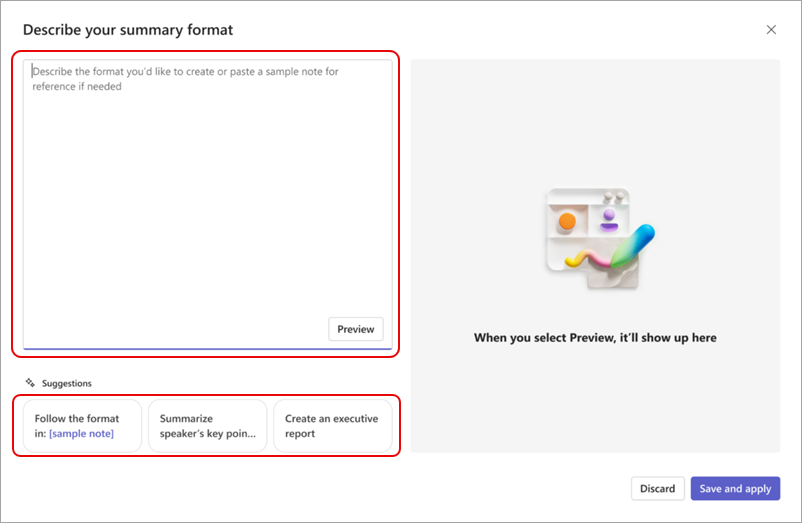
After the meeting, open Recap from the meeting chat. Where Custom summary is available, choose Create template, describe a task | owner | due date | evidence format, then Preview and Save and apply.
-
Review before circulation
The meeting owner checks every name, date and decision against the transcript or recording, sends unconfirmed items back to participants and records all corrections before publishing the register.
Practical next step
- Free AI & Workflow Project Planner: Define the meeting input, action-register format, reviewer and 30-day measures.
- AI consulting and implementation
- Hong Kong AI tools guide