

Fix one workbook, period and comparison
Choose a recurring management workbook with a named owner and select one comparison: actual versus budget, current month versus previous month, or current year versus previous year. Do not combine several sources or ask for a new forecast. Save the current time required for commentary and the reasons reviewers usually return it.
Make the data understandable before asking for commentary
Use consistent column names, periods, units, signs, departments and categories. Resolve blanks, merged cells and colour-only conventions. When one column mixes percentages and amounts or a definition exists only in a colleague’s memory, repair the workbook first. AI cannot convert ambiguous data into reliable management information by itself.
Define the threshold and output format
Ask for a fixed number of material variances above a threshold approved by the workbook owner. Present the observed values first and label possible causes as requiring business confirmation. Do not ask Copilot to assign blame or provide financial advice. The threshold belongs to the reporting context and is not a universal iGears standard.
Reconcile every value with the workbook
The reviewer confirms period, comparison base, formula, unit and direction, then removes any causal explanation unsupported by the data. If Copilot highlights an outlier but cannot locate it reliably, retain the question rather than the conclusion. Generated commentary is not an audit, formal validation or financial advice.
Measure corrections and review effort, not generation speed alone
Record incorrect values, wrong comparisons, unsupported explanations, missed material variances, review time and the proportion accepted. Fast generation with slower reconciliation is not useful. When one table structure performs consistently, lock the template and prompt before testing the next reporting period.
Leave forecasting, formulas and system write-back to separate MVPs
At day 30, decide only whether to retain the variance-commentary draft. Forecasting, formula changes, automated data cleaning and posting text into a finance or reporting system have separate control and approval requirements. Add one capability at a time while keeping the workbook owner accountable for the final figures and explanation.
Interface and requirements checked 27 August 2026
Current Excel setup and operating steps
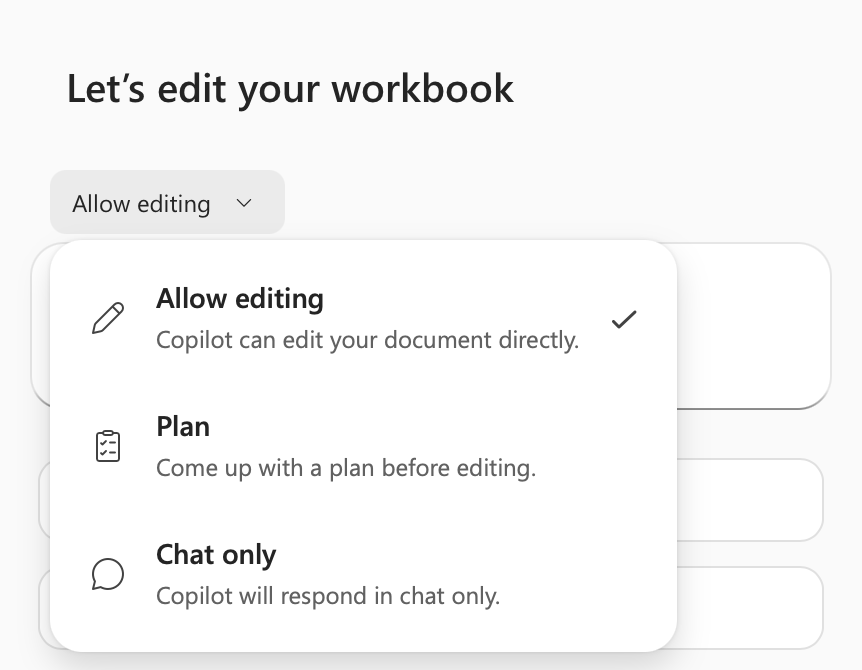
Current Excel releases open Copilot from the Dynamic Action Button in the workbook’s lower-right corner and offer Allow editing, Plan and Chat only modes. Start this analysis MVP in Chat only so Copilot does not directly change the controlled workbook.
-
Fix the controlled workbook
Use one workbook with a named owner, unambiguous columns, periods, units and comparison. Set Calculation Options to Automatic. AutoSave can be on or off; it is no longer a current hard requirement.
-
Open Copilot from the lower-right corner
Select the Copilot Dynamic Action Button, or move focus to it with Alt + C or F6, to open the right-hand pane.
-
Choose Chat only
Select Chat only so the response remains in the conversation. If Allow editing is used later, add a separate change-review and version-recovery control.
-
Ask one explicit variance question
Name the table, one comparison, reporting period, amount or percentage threshold and required output fields. Ask Copilot to identify the supporting cells or data locations.
-
Reconcile every value
The workbook owner checks formulas, period, units, direction and material omissions. Possible causes remain marked for business confirmation before the text becomes management commentary.
Practical next step
- Free AI & Workflow Project Planner: Define the workbook, comparison, output, reviewer and measurable stop condition.
- AI consulting and implementation
- Hong Kong AI tools guide
References
- Microsoft: Get data insights with Copilot in Excel
- Microsoft: Get started with Copilot in Excel
- Microsoft: The Copilot Dynamic Action Button in Word, Excel and PowerPoint
- Microsoft: Microsoft 365 Copilot minimum requirements
- Microsoft: What Copilot license do I have?
- Microsoft: Microsoft 365 Copilot privacy and security