

Select one policy family and one controlling source
Current leave policy can be a reasonable starting point. Do not add pay, disciplinary records, employee cases and benefit-provider data at the same time. Remove duplicate and superseded files, then give every policy an owner, effective date and review date. If two documents disagree, HR must identify the controlling version before the agent is tested.
Write a scope that can refuse questions
The agent answers general questions that the policy text supports and points to the source. Personal eligibility, exceptions, legal interpretation and case advice go to HR. A well-designed refusal makes the boundary visible; a disclaimer does not repair an agent that continues to answer outside the approved scope.
Review creator and user access before configuration
SharePoint agents operate within current access and tenant settings. Confirm who can create or change the agent, who can open every source, whether shared links are too broad and which roles the test accounts represent. Existing permissions may be respected, but an agent does not automatically correct a library that was already overshared.
Test answerable, ambiguous and out-of-scope questions
Build three test sets: questions with a clear current answer, ambiguous questions that require clarification, and questions that must be refused or escalated. Record the response, source, version, correction and destination for every case. A demonstration containing only easy questions does not establish readiness for daily use.
Measure traceability and escalation quality
Track correct links to the controlling source, obsolete references, incorrect answers, unanswered questions, out-of-scope answers, HR correction time and whether users reach the human channel. If most requests need individual judgement, keep the agent as a navigation and policy-finding tool rather than expanding it into decision support.
Confirm maintenance ownership before adding another policy family
Continue only when policy owners can update the library, access tests pass, sources remain traceable and escalation works. Employee data, approvals and transactions constitute another project and require a fresh review of privacy, permissions, records and human authorisation.
Interface and requirements checked 27 August 2026
Current SharePoint agent setup and operating steps
Start with one governed policy library or folder as the agent’s only knowledge boundary. The creator needs Edit permission on the site and either an eligible Microsoft Copilot licence or a tenant configured for SharePoint agent pay-as-you-go.
-
Prepare the controlling sources
Keep only approved current policies with an owner, effective date and review date. Remove duplicates and superseded files. Do not make this MVP depend on SharePoint List data.
-
Create a custom agent from the library
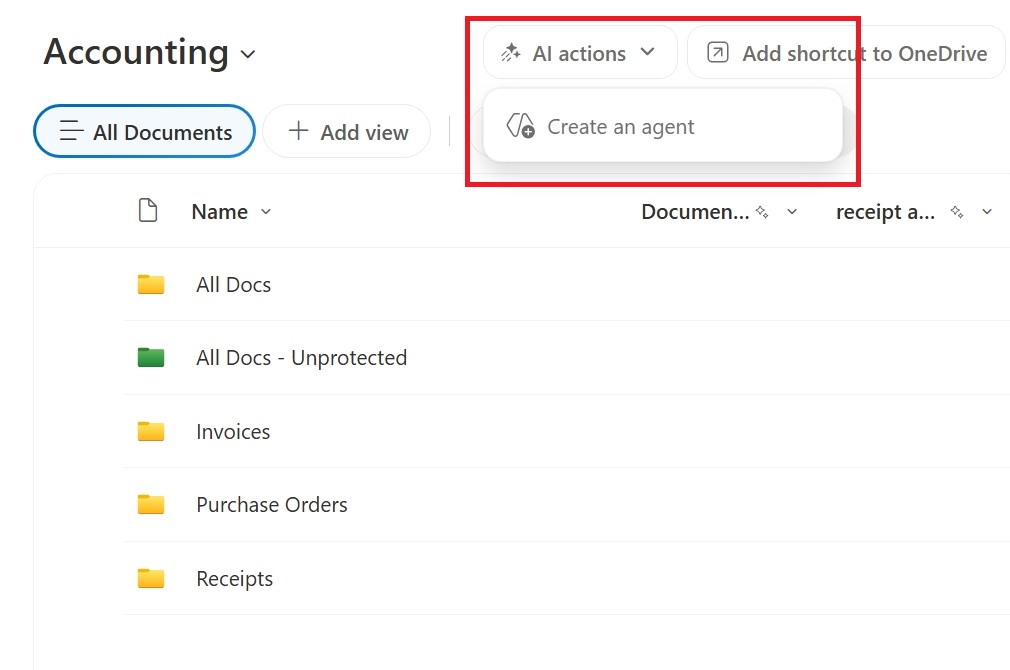
On a modern SharePoint site, choose New > Agent, or choose AI actions > Create an agent in the document library. Select a library, folder or files; the current limit is 20 source items, with a library or folder counting as one item.
-
Configure Overview, Sources and Behavior
Confirm the purpose, choose the approved sources and prioritise those knowledge sources. In Behavior, require the document title and effective date and a clear not-found response when the sources do not support an answer.
-
Test questions and access roles
Use answerable, ambiguous and out-of-scope question sets, then repeat them with accounts representing different permissions. Each user must receive only content they could already access.
-
Share the .agent only after acceptance
Share the custom .agent with pilot users only after answers, citations, refusals and HR escalation pass. The ready-made site agent cannot be edited or shared and is not suitable for this controlled MVP.
Practical next step
- Free AI & Workflow Project Planner: Define the library, users, permissions, answer boundary, escalation and measures.
- AI consulting and implementation
- Hong Kong AI tools guide